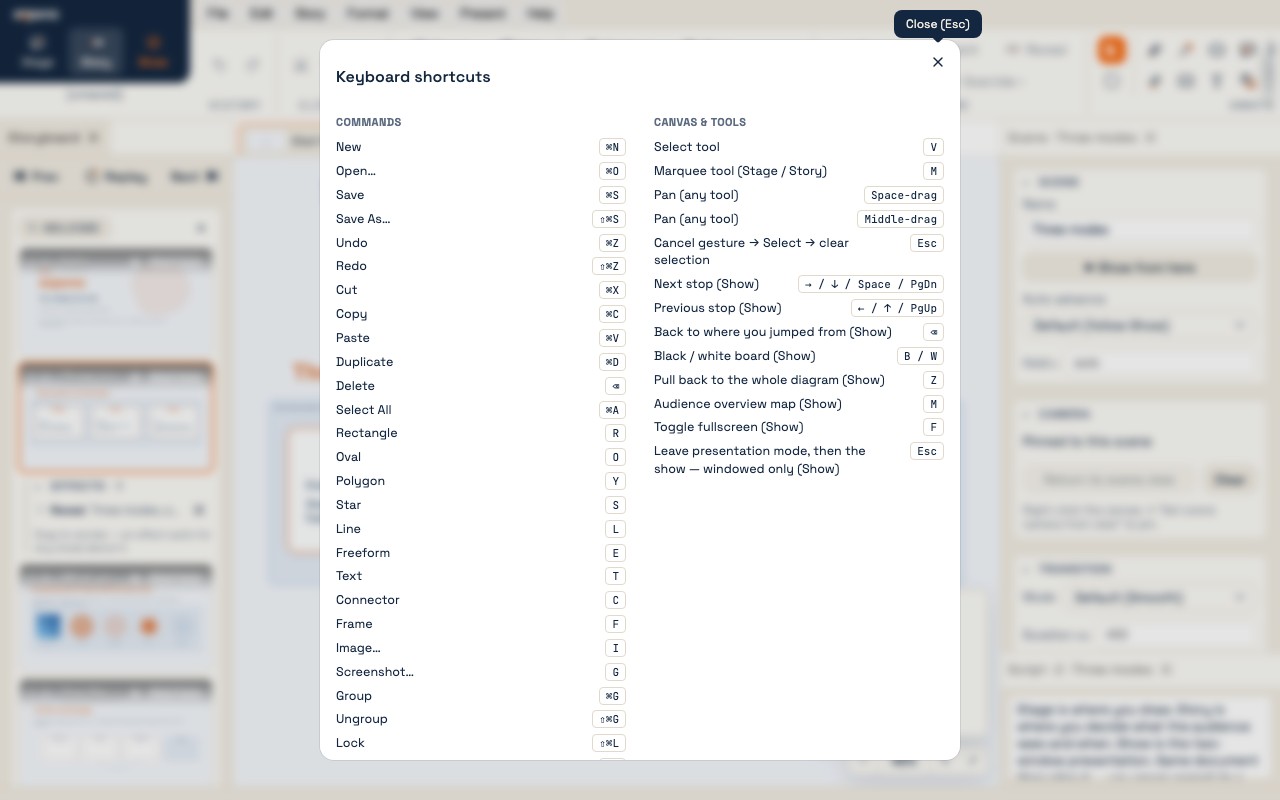
Every keyboard shortcut and menu at a glance. In the app, Help → Keyboard shortcuts shows the same list, and ⌘K opens the command palette, which finds any command by name.
The keyboard shortcuts dialog — Help → Keyboard shortcuts.
The three modes
Step
Mode
You do
1
Stage
Place shapes from the palette, connect them, frame regions, pick a theme
2
Story
Add acts and scenes; set visibility and spotlight, add animations, capture cameras, write the script
3
Show
Present → Show from start, then drive from the presenter view
Keyboard shortcuts
File
New (blank)
⌘N
Open…
⌘O
Save
⌘S
Save As…
⇧⌘S
Edit
Undo
⌘Z
Redo
⇧⌘Z
Cut
⌘X
Copy
⌘C
Paste
⌘V
Duplicate
⌘D
Delete
⌫
Select All
⌘A
Insert (arm a tool)
Rectangle
R
Oval
O
Polygon
Y
Star
S
Line
L
Freeform
E
Text
T
Connector
C
Frame
F
Image…
I
Screenshot…
G
Canvas
Select tool
V
Marquee tool
M
Pan (any tool)
Space-drag or middle-drag
Zoom to fit
⌘0
Nudge
←→↑↓
Nudge by a grid step
⇧ + arrow
Cancel gesture → Select → clear selection
Esc
Command palette
⌘K
Arrange
Group
⌘G
Ungroup
⇧⌘G
Lock
⇧⌘L
Show
Next stop
→↓SpacePgDn
Previous stop
←↑PgUp
Back to where you jumped from
⌫
Black / white board
B / W
Pull back to the whole diagram
Z
Audience overview map
M
Toggle fullscreen
F
Leave presentation mode, then the show
Esc
The tools
The drawing tools live in the Basic section at the top of the Shapes palette, and on the Insert menu with their keys. A tool is one-shot: it returns to Select after one use. Hold Shift while drawing a rectangle or oval for a square or a circle.
Tool
Key
Draws
Select
V
Click to select, drag to move; drag an empty area to marquee-select
Marquee
M
A selection rectangle, even when the drag starts on an object
Rectangle · Oval · Polygon · Star
ROYS
A basic shape; sides, points and corners are dials in the Inspector
Line
L
A line with waypoints — click to add, double-click to finish
Freeform
E
A freehand path
Text
T
A text box
Connector
C
A connector from one object's port to another's
Frame
F
A labeled region that captures the objects inside it
Image · Screenshot
IG
An image from a file, or a capture of a window or screen
Kinds of object
Kind
Description
Connectable?
Shape
A box-like object — from a pack, or drawn with a basic tool
Yes
Connector
A line between two objects; routes itself, carries a label and arrowheads
No
Frame
A labeled region that carries its members when moved
Yes
Line
A drawn line with waypoints — not a connection, just ink
No
Text
A standalone text box
No
Image
A picture, placed as a shape
Yes
Animations at a glance
Kind
Button
Target
Behavior
Flow
Flow
A path of connectors
A marker travels the path; loops
Accent · Glow
Accent
Any object
A breathing halo; loops
Accent · Scale
Accent
Any object
The object breathes bigger and smaller; loops
Accent · Ring
Accent
Any object
A ripple from the outline; loops
Reveal
Reveal
A sequence of objects
They draw on or fade in, one after another; once, on entry
The menus
Menu
What is on it
File
New ▸ (Blank, or a diagram type) · Open · Save · Save As · Export as image · Export as PDF · Export as draw.io or Mermaid · Shape packs… · Import shapes · Open recent packs · Import diagram · Import slide deck (PDF) · Paste diagram text
Auto-arrange ▸ (flow, tree, mind map, radial) · Tidy up · Align · Distribute · Z-order · Group · Ungroup · Combine ▸ · Reverse direction · Lock
Format
Line style ▸ · Line weight ▸ · Font ▸ · Text size ▸ · Fill pattern ▸ · Reset to theme style · Document properties · Themes…
View
Appearance ▸ (System, Light, Dark) · show and hide the panels · Focus canvas · Reset panel layout · Show overview · Grid ▸ · Zoom to fit · Stage / Story
Story (Story mode)
Add Act · Add Scene · Duplicate / Delete Scene · Spotlight selection · Capture camera · Frame selection · Clear camera · Return to scene view · Replay animations · Add flow / accent / reveal · Previous / Next scene
Present
Show from start · Show from current scene
Help
Command palette… · Keyboard shortcuts · User guide (online) · Reload guide document · Report a bug… · About expono
Files
Extension
Purpose
.xpd
A project — diagram, pages, acts, scenes, theme, and embedded images
.xpp
A shape pack or a theme, shared as a file
.drawio · .mmd · .excalidraw
Diagrams from other tools — File → Import diagram…, or paste the text